
(Updated February 2020)

If you’re a little bit curious about what Gedmatch.com is and why you would want to upload your DNA there, read on.
What is Gedmatch?
If you have already done DNA testing with another company, Gedmatch allows you to take your DNA file from that company and put it in their database.
Why would I want my DNA in their database?
Since Gedmatch allows DNA to be uploaded from different testing companies, you’ll be able to get matches to people from the companies you didn’t test at, if they have also uploaded their DNA to Gedmatch. Plus, Gedmatch offers tools to analyse your DNA that some companies do not offer.
I have enough matches, and I’m not interested in these tools. Why should I bother with Gedmatch?
If someone who shares DNA with you asked you to upload your DNA to Gedmatch, the information they can get from this will be invaluable to their research.
But I already know how we’re related…
One of the things the Gedmatch tools can tell you is where on your DNA you are related, right down to the address on a particular chromosome. Anyone else who shares DNA with you at that spot likely inherited it from the same ancestor. Now your relative will be able to pinpoint how everyone else is related to you and them, which can be extremely helpful in cases where family trees are sparse (like in the case of adoptees).
How much does it cost?
It’s FREE! Like my dad always says, “If it’s free, it’s for me!” There are more advanced tools that require a subscription, but everything you need to work with it is free.
What about privacy?
This is an important concern! Please read the Terms and Conditions. I also wrote a blog post about DNA and privacy here.
How to I upload my DNA to Gedmatch?
Well, the easiest way is to get someone who knows how to do it to do it for you. If a close family member tested, they can add your DNA file to their account. This is ideal if you aren’t interested in playing with Gedmatch or getting emails from other matches. If you want to have control of your own account, however, read on.
Step 1: Make an account at Gedmatch.
a) Go to the website and click where it says “Not registered? Click here.”

b) Fill in the registration information
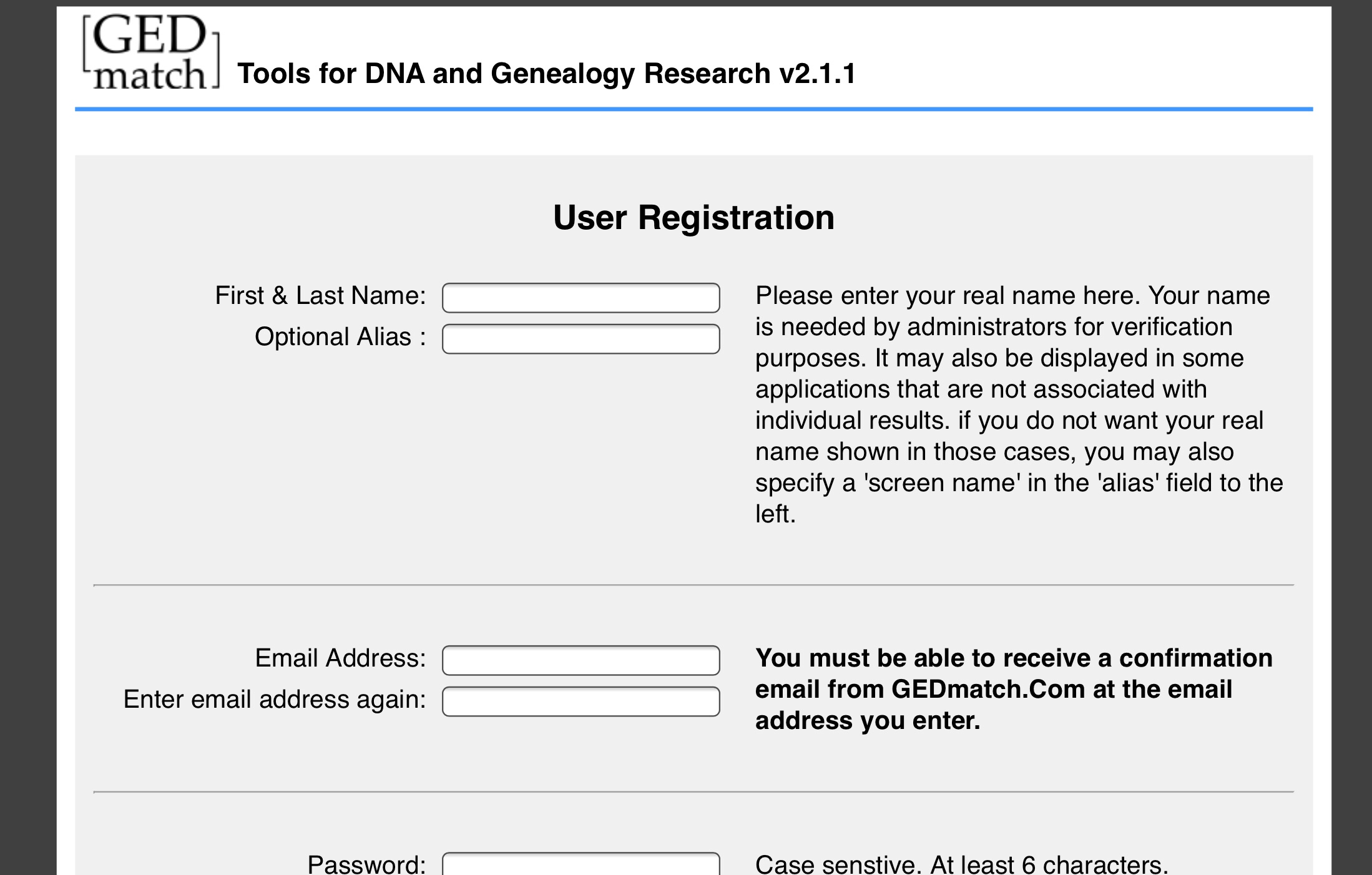
c) After filling in the registration page, you’ll be taken to the next page. Check your email for a confirmation code from Gedmatch, then put that code in the box. Once you hit “confirm,” you’re all ready to proceed to Step 2!

Step 2: Download your DNA from your testing company. Here is a really great link to show you how to do that.
Step 3: Uploading your file to Gedmatch.
a) On the Gedmatch homepage, under file uploads, click on Generic Uploads.

b) fill in the required information. Note that you can use an alias for your DNA rather than your real name. Click on choose file.

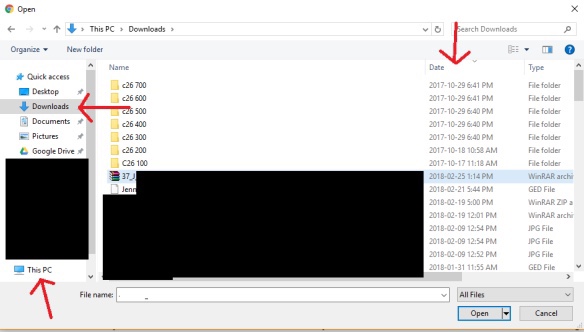
c) Find your file. Your file is located in your downloads folder. If you don’t see your downloads folder, click on This PC, then click on Downloads. Your file should be right under any folders that are in your downloads. You can sort the files by date by clicking on date if you don’t see it. Look for today’s date, the file you are looking for should be the first one with that date. Once you have selected the correct file, click Upload. Be patient while it uploads!
Once your file uploads, you’ll need to wait a bit for Gedmatch to finish processing it. Once that happens, you’re good to go! Try playing around with it to get the hang of it. Coming up next, Gedmatch Basics.


 Jennealogie
Leave a reply to What’s the use of a chromosome browser? | Jenealogy Cancel reply