
I finally figured out lines in LucidChart! You’ll remember that in my post on Scapple (1) I said that I preferred Scapple to LucidChart because it was so much simpler (not to mention the one time fee vs. a subscription). However, I’ve since discovered that sometimes simpler can mean limited, and LucidChart does produce some really beautiful charts…
First, the deal with the lines. I wish I had known when I started that unlike the drawing program I’m familiar with (*cough*MS Paint*cough*), there is an additional option for lines. I was familiar with changing the endpoints (like if you wanted a line or an arrow) or changing the line (whether you wanted solid or broken) or changing the line thickness, but LucidChart also allows you to change the type of line, as seen here:
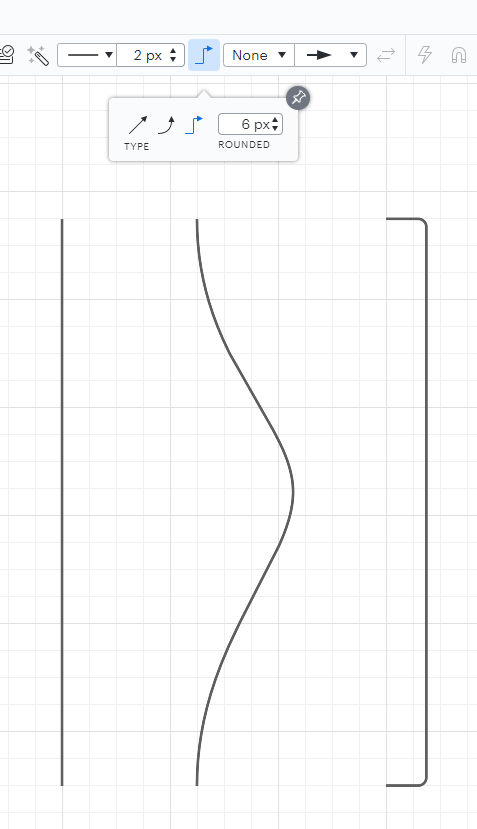
When I’m making a family tree, I don’t want anything but the first line, but the default was the last line. So the advice that is usually given when people complain about having problems with their lines — just do the lines last — wasn’t going to help me, because I’m not going to be able to make the kind of line I want until that setting is adjusted.
Once I got that sorted, the rest was a piece of cake! The thing about LucidChart as opposed to Scapple is that you can make sure all your boxes are nice and evenly spaced and perfectly lined up:

You have a lot more variety in terms of colour and shapes, and you can do layering. I’ve seen some pretty neat layered charts! I also like the tabs in LucidChart, since if you have a bunch of different charts you can keep them all connected without cluttering up one screen. Also, if you’re working collaboratively, Scapple saves to your computer, whereas anyone with a link can access your LucidChart to work on it.
If I was just using the charting program for my own personal genealogy, I would probably still stick with Scapple. But if I needed to work collaboratively and/or produce more professional looking charts, LucidChart is definitely the way to go! Check out this link (4) for a basic tutorial.
1) Jennifer Wiebe, “Why I Love Scapple,” Jennealogie (https://maltsoda.wordpress.com/2020/07/09/why-i-love-scapple/ : accessed 29 April 2022).
2) Jennifer Wiebe, digital photo, Types of lines in LucidChart, April 2022, author’s files.
3) Jennifer Wiebe, digital photo, LucidChart, April 2022, author’s files.
4) LucidChart, “Learn and Master the Basics in Lucidchart,” Youtube (https://youtu.be/uWwoZ67vD_I : accessed 29 April 2022).


 Jennealogie
Leave a comment